
The Procedure Code List is a list of procedure codes that includes the procedure code number, description, abbreviated procedure codes, time allotted for each procedure, appointment type, paint type, and treatment area.
To generate the Procedure Code List
1. In the Reports menu in the Office Manager, point to Reference, and then click Procedure Code List.
The Procedure Code List dialog box appears.
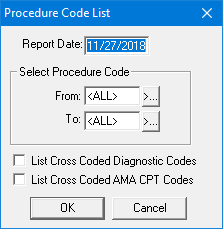
2. Type the Report Date to print on the report. The default is the current date.
3. Under Select Procedure Code, select the range of procedure codes that you want to include by doing the following:
Click the From search button and select the starting procedure code for the range.
Click the To search button and select the ending procedure code for the range.
4. Select List Cross Coded Dental Diagnostic Codes to include cross-coded diagnostic codes on the list.
5. Select List Cross Coded AMA CPT codes to include cross-coded AMA CPT procedure codes on the list.
6. Click OK to send the report to the Batch Processor.